From empty unit to signed lease, without the re-typing.
Your agent drafts the listing and reads the paperwork. Prospects book their own showings. Applications, screening and e-signature run in one pipeline, and an approved applicant becomes a tenant with a draft lease. Every decision about who moves in is yours.
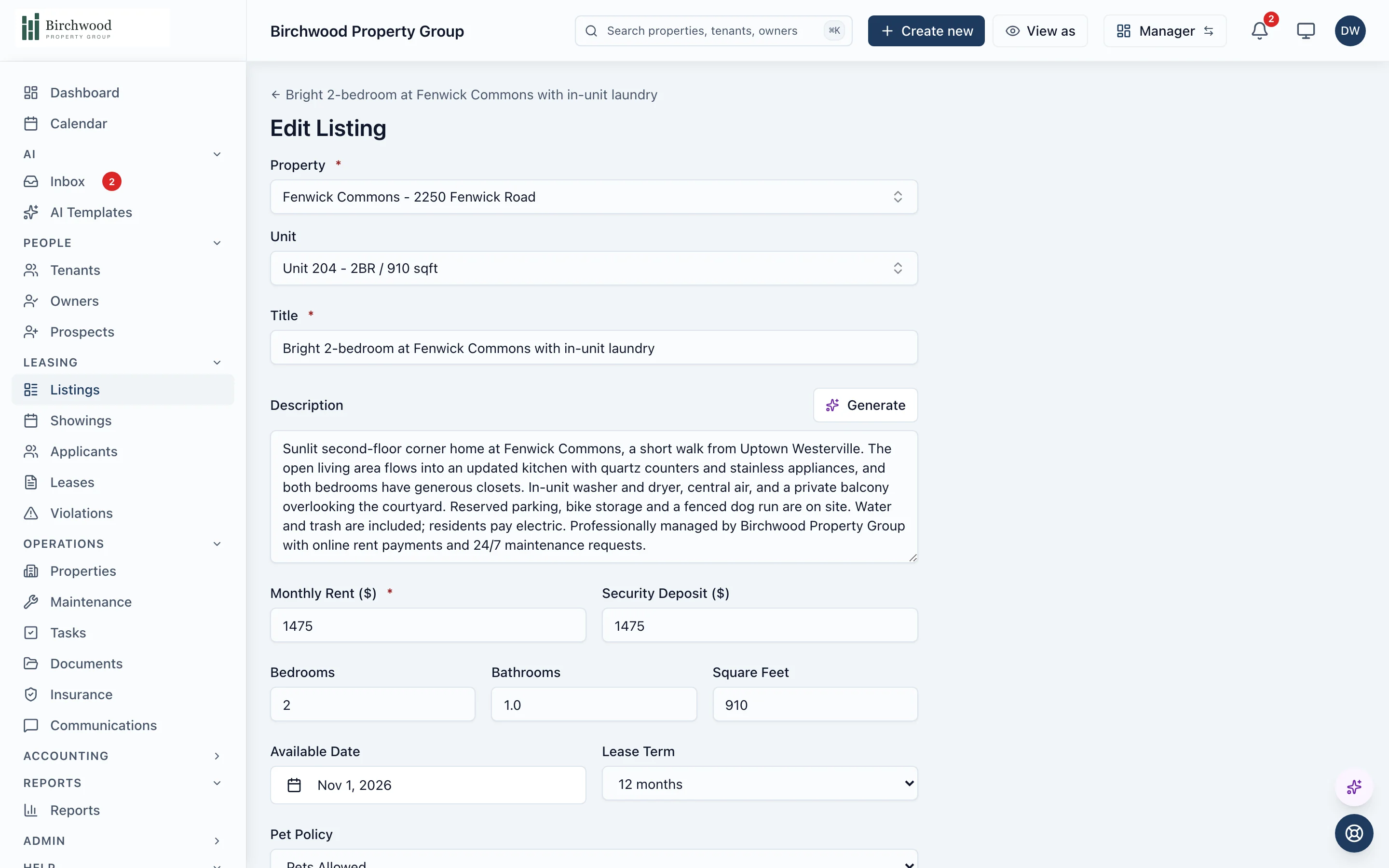
The agent does the paperwork. You decide who moves in.
The drafting and the reading
- Drafts the listing title and description from the unit's data, in a professional, casual or luxury tone
- Reads an applicant's driver's license and pre-fills the application
- Reads a Section 8 HAP contract and pulls out the amounts, dates and parties to pre-fill the lease
- Drafts the renewal offer and explains the terms, with the rent calculated from the lease and the unit's market rent
The decisions
- Edit and publish each listing yourself
- Request screening, then approve, conditionally approve or deny each application
- Check every extracted field before it lands on the lease
- Review and send each renewal offer
How a vacancy moves
Publish the listing
The listing goes live on your PaxRent site with photos, a move-in cost calculator and Apply and Tour buttons.
Prospects find it
Each inquiry becomes a prospect, and a waitlist catches interest in units that are not ready yet.
They book a showing
Prospects pick a time themselves. A reminder goes out the day before, with one click to confirm.
They apply
From the listing, or from the link you send after a showing. Application fees are checked against your state's cap.
You screen and decide
Each adult on the application is screened separately. You approve, approve with conditions or deny.
Approved becomes tenant
One click turns an approved application into tenants with a draft lease, ready to send for e-signature.
What is included
Listings
Published in minutes, shown the way you choose.
- Public listing pages with a photo gallery and a map
- Move-in cost calculator: first month, deposit and application fee
- Visibility tiers for available now, available soon and unavailable units
- A listing feed URL you can hand to a platform that accepts one
Showings
Tours booked without phone tag.
- Self-service booking on the days and times you open
- A reminder the day before by email, and by text where texting is on, with one-click confirm
- Prospects can cancel or reschedule from their link, and you are told
- Notes and follow-up flags on every showing
Applications and screening
One pipeline from inquiry to decision.
- A prospect pipeline from new to applied, with duplicates merged
- Cold applications from the listing and warm ones after a showing
- Co-applicants, each with their own screening and signature
- Application fees checked against state caps
Lease and renewal
Signed, scheduled and on the record.
- Lease templates you upload once and reuse, sent for e-signature
- One-click conversion of an approved applicant into tenants and a draft lease
- Renewal offers with several options, such as a fixed term or month-to-month
- Accepted renewal terms scheduled onto the same lease, so the ledger stays continuous
Questions about leasing
Does PaxRent publish my listings to Zillow or Apartments.com?
Not directly. Your listings publish to your own PaxRent listing pages, and each listing can be included in a standard listing feed whose URL you can give to a platform that accepts one. PaxRent does not push to Zillow.
Does the agent decide who gets approved?
No. The agent reads documents and pre-fills fields, and you check them. Screening is requested by you, and you make the approve, conditional or deny decision on each application.
How does screening work for a household with several adults?
Each adult is screened separately, and the application's status follows the whole household. If you deny, each screened adult gets their own adverse action notice.
Can tenants sign their lease online?
Yes. Upload your lease template once, mark where each signer signs, and send it for e-signature. Renewal agreements go out the same way.
What happens to a lease when the tenant renews?
The renewal's executed terms are scheduled onto the existing lease instead of creating a second one, so the resident's ledger, deposit and autopay carry on without a break.
Fill the next vacancy with less typing.
Get started, and the agent drafts the listing for your next empty unit.