Maintenance that gets triaged before you open it.
A tenant reports a leak. Your agent reads it, sets the category and priority, recommends a vendor and waits for your approval. The vendor's invoice is read and checked against the estimate, and the cost lands on the owner statement.
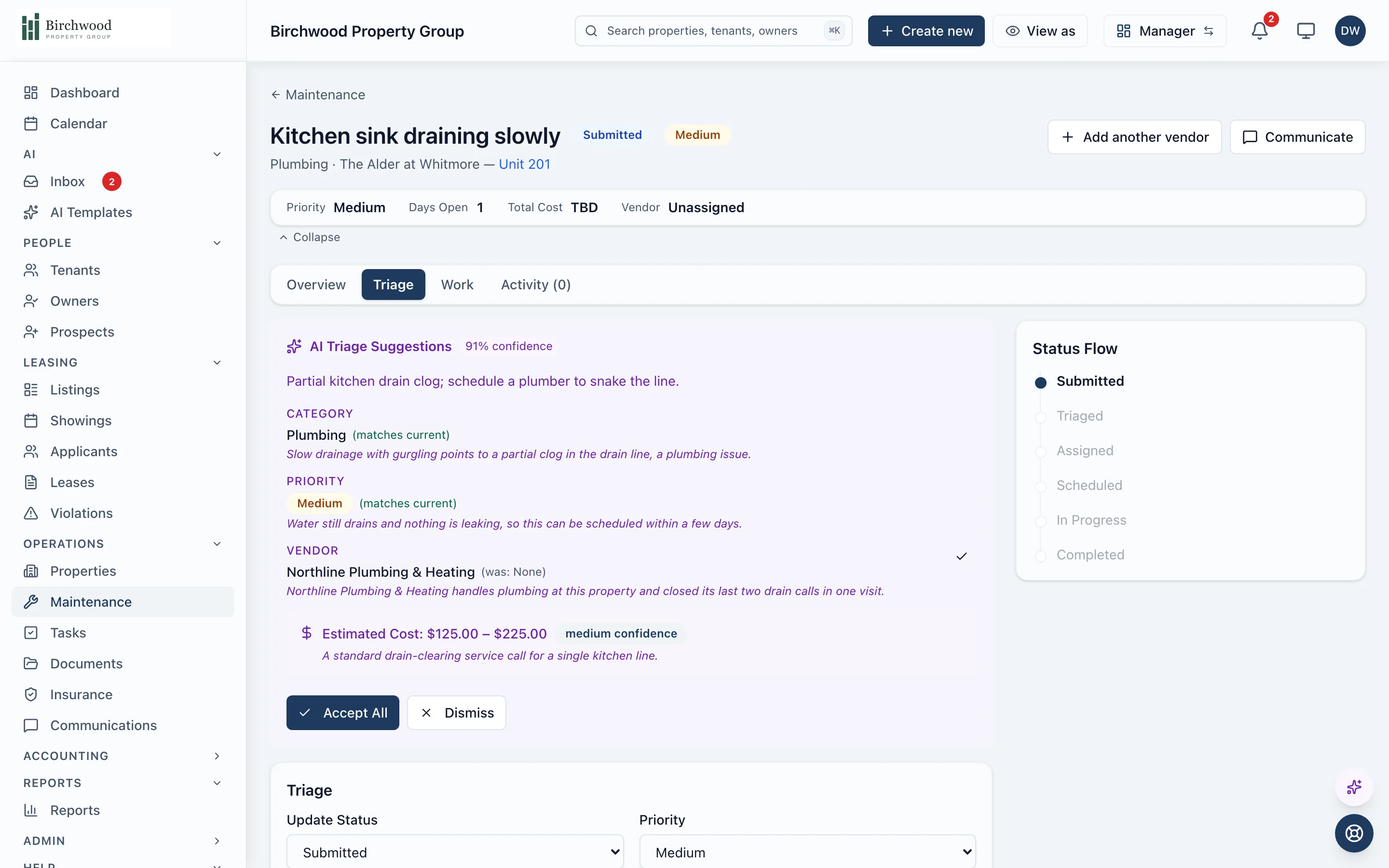
The agent does the sorting. You make the calls.
The reading, sorting and recommending
- Categorizes every request: plumbing, electrical, HVAC, appliance and more
- Sets the priority from what the tenant wrote
- Recommends a vendor, with your roster ranked by past performance, availability, distance, rate and compliance
- Reads the vendor's invoice and checks it line by line against the approved estimate
Who goes, and what gets paid
- Approve or change the recommended vendor before anything is sent
- Owners approve invoices above the not-to-exceed amount you set
- Approve hours and materials before they are billed
- Approve each bill before it posts to the books
How a request moves
The tenant reports it
From the tenant portal with photos, after a troubleshooting guide that can solve the simple ones first.
The agent triages it
Category, priority and a recommended vendor are ready when you open the request.
You approve the dispatch
The vendor accepts from their portal or an emailed link, sends an estimate and books a time.
The work gets done
Check-in and check-out on site, hours and materials logged, before and after photos.
The invoice becomes a bill
Read by the agent, checked against the estimate, approved by you, posted to the ledger.
The owner sees the cost
On the owner portal and the next statement, with the invoice a click away.
What is included
Intake
Requests arrive complete.
- Tenant portal requests with photos and video
- Troubleshooting guides tenants can try first
- Requests your staff file for any unit, occupied or vacant
- After-hours emergencies escalated to your on-call list by call, text or email
Dispatch
The right vendor, with the reasons shown.
- Vendor fit score with a per-factor breakdown
- Estimate requests and a side-by-side comparison
- Owner approval above your not-to-exceed amount
- An optional gate that holds back vendors with missing or expired documents
On site
Every visit is on the record.
- Check-in and check-out for every visit, with location
- Hours and materials logged against the work order
- Before and after photos
- Several trades on one job, with one request for the tenant
Follow-through
Nothing closes without a trail.
- Response and resolution targets by priority
- Preventive maintenance schedules
- A satisfaction survey for the tenant after the job
- Maintenance cost by property, category and vendor
Questions about maintenance
Can the agent dispatch a vendor without me?
Not unless you turn that on. Out of the box the agent recommends a vendor and you approve the dispatch. In settings you can let it dispatch requests in the categories you choose when it is confident, and every automatic dispatch is noted on the request.
Do vendors need an account?
No. A vendor can work from an emailed link for each job, or sign in to the vendor portal to see their jobs, estimates and invoices in one place.
What happens with an emergency at night?
When the agent marks a request as an emergency outside business hours, PaxRent works down your on-call list by phone call, text or email until someone acknowledges it. You choose the contacts and the channels.
Can owners see what was spent?
Yes. Owners see each request on their portal with its status, photos and cost, can download the invoice, and approve anything over the amount you set.
Do I still need a separate maintenance app?
No. Intake, dispatch, estimates, invoices and vendor performance are part of PaxRent, on the same plan as everything else.
See maintenance run on your portfolio.
Get started, and the agent triages the next request your tenants send.